In the Master Member Rebate Program page, you can define the portion of the calculated rebate that is paid directly to the member and which portion is held by Unipco, until the year-end.
The Sage Export Member Rebates will use the percentages to calculate the amount for the members rebate invoices and will use the provided prefix to generate the invoice numbers.
If no ratio is defined for certain periods, it will default to 100% to the member.
The Sage accounts that will be used for the transfer are defined under each individual member rebate program under Member Rebate Programs
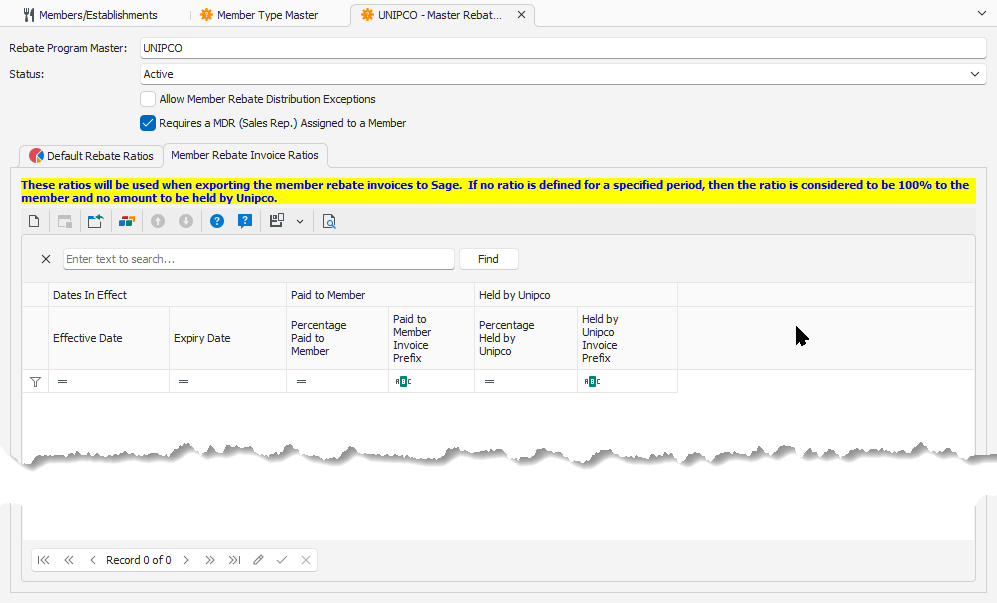
To add a new Member Rebate Invoice Ratio, click on the New button  .
.
Enter the information in the following screen:
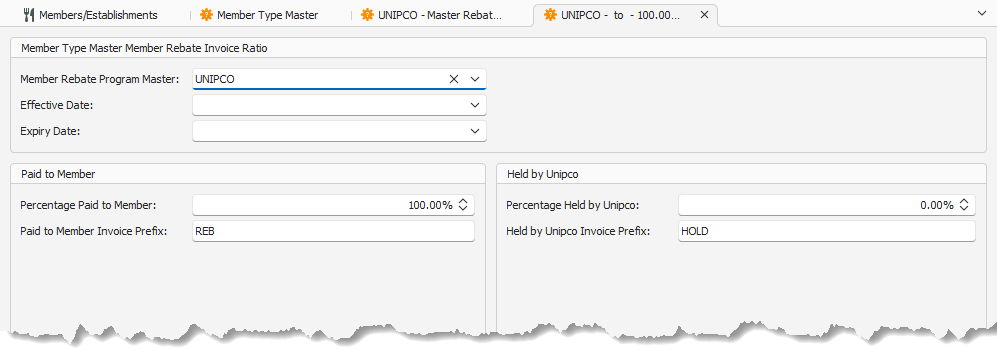
•Member Rebate Program Master
•Effective Date
•Expiry Date
•Paid to Member
oPercentage Paid to Member: Percentage of the rebate amount that will be paid directly to the member. Enter the value as a decimal, where 1 equals 100% (example: 85% is to be entered as 0.85).
oPaid to Member Invoice Prefix: This is the prefix to be used for the invoices paid directly to the member, to distinguish from the invoices that will be held by Unipco. Should not be more than 4 characters, because of the limitation on the length of invoice numbers in Sage.
•Held by Unipco
oPercentage Held by Unipco: Percentage of the rebate amount that will be held by Unipco until the year-end. Enter the value as a decimal, where 1 equals 100% (example: 15% is to be entered as 0.15).
oHeld by Unipco Invoice Prefix: This is the prefix to be used for the invoices that will be held by Unipco, to distinguish from the invoices that will be paid directly to the members. Should not be more than 4 characters, because of the limitation on the length of invoice numbers in Sage.
IMPORTANT: The Percentage Paid to Member and Perecentage Held by Unipco shall always equal to 100% combined.