The Member Rebate Programs grid displays all Rebate programs contained in the database.
The Grid listing can be grouped by various grid headers. ( see Grid for more information)

•To create a new Rebate Program record select on the tool bar the New  button.
•To open a Rebate Program record double click the Rebate Program record and the Rebate Program profile will be displayed. Once the Rebate Program profile is open the user can edit the information it contains.
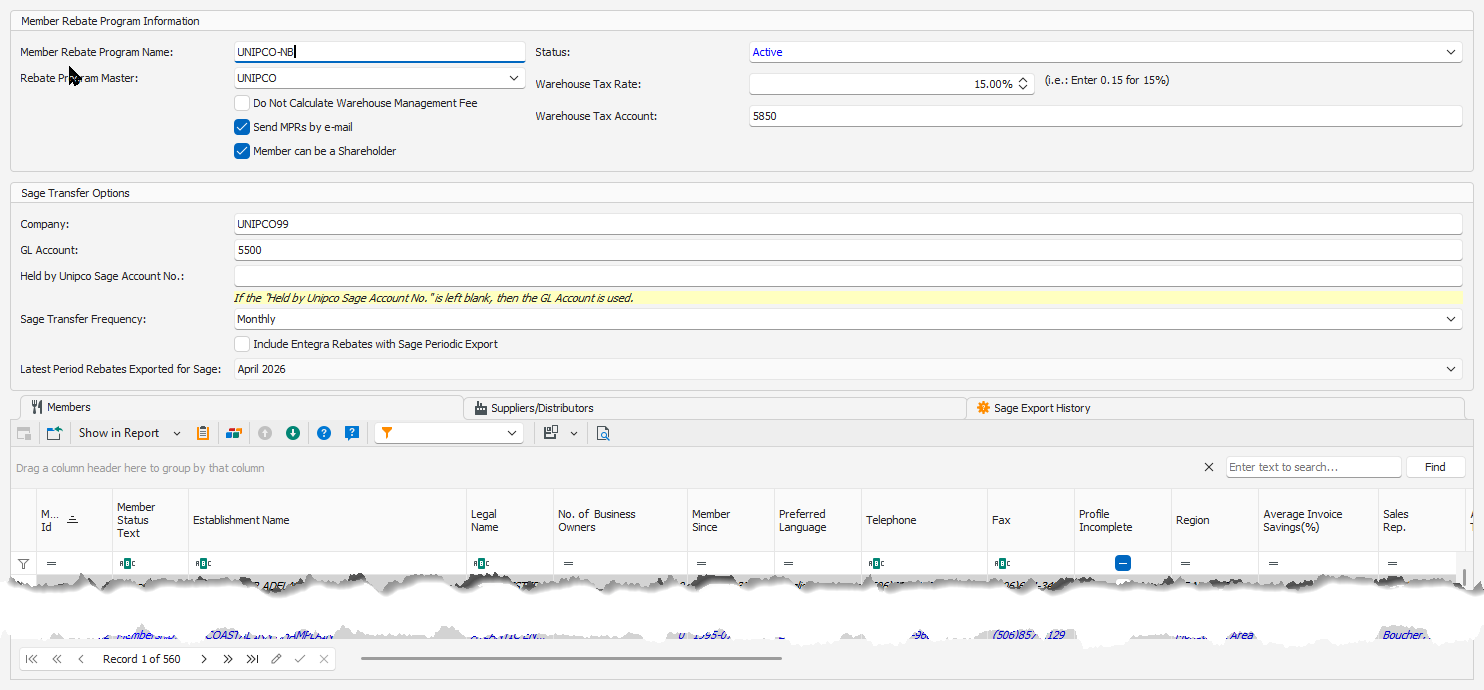
Member Rebate program Information:
•Member Rebate Program Name: Name of the rebate program (must be unique)
•Rebate Program Master: Parent rebate program, this allows to group multiple rebate programs together.
•Do Not Calculate Warehouse Management Fee: Place a checkmark if the warehouse management fee shouldn't be calculated for the Member Rebate Program Name.
•Send MPRs by e-mail: Place a checkmark for sending the MPRs by e-mail
•Member can be a Shareholder: Place a checkmark so that a member under the Member Rebate Program Name can be a shareholder.
•Status: Status of the rebate program: Active or Non-Active
•Warehouse Tax Rate: Enter the tax rate to be calculated if withholding taxes for the member.
•Warehouse Tax Account: Enter the Sage account number for the warehouse tax.
Sage Transfer Options:
•Company: Simply Accounting Company associated with the rebate program
•GL Account: Number of the Sage Accounting GL account to register the rebate amounts
•Held by Unipco Sage Account No.: Sage account used for the amount that is held by Unipco related to a member's rebate. If this field is blank, then the GL Account is used. This Sage Account No. will be used if an amount of the member's rebate will be held by Unipco as defined by Member Rebate Invoice Ratios.
•Sage Transfer Frequency: Select the frequency that the member rebates are exported to Sage:
oMonthly: Send the members rebates total once a month
oQuarterly: Send the members rebates total once every calendar year quarter(January-March, April-June, July-September and October-December)
oSemi-Annual: Send the members rebates total once every 6 months(January-June and July-December)
oAnnual: Send the members rebates total once a calendar year(January-December)
oDirect: No specific period, but behaves like the Monthly.
•Include Entegra Rebates with Sage Periodic Export: Place a checkmark if the Entegra rebate amounts are to be added to the members rebates total amount.
•Latest Period Rebates Exported for Sage: Indicates the most recent period that the rebates were exported to Sage for the Member Rebate Program Name.
Members tab:
Contains a list of member associated to this Rebate program.
•To add a new member use the New  record button in the tab section.
•To link an existing member to the rebate program select the Link  button.
•To Unlink (remove) a member from the rebate program, select the unlink button.
•To edit a member record double click the record.
The Members Profile will be displayed.
Warehouse Management Fees tab:
Contains a list of the Warehouse Management Fees associated to this Rebate program.
•To add a new Warehouse Management Fees use the New record button in the tab section.
•To link an existing Warehouse Management Fees to the rebate program select the Link button.
•To Unlink (remove) a Warehouse Management Fees from the rebate program, select the unlink button.
•To edit a Warehouse Management Fees record double click the record.
The Warehouse Management Fees Profile will be displayed.

Sage Export History tab:
Contains the history of the Sage exports of the members rebates associated with the Member Rebate Program Name.