XLS-Specific Export Options
When exporting a document , you can define XLS-specific export options using the following dialog.
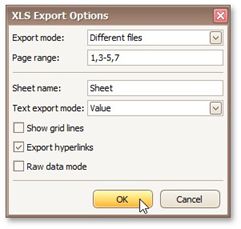
•Export mode
Specifies how a document is exported to XLS. The following modes are available.
The Single file mode allows export of a document to a single file, without dividing it into pages.
The Single file page-by-page mode allows export of a document to a single file, divided into pages. The Different files mode allows export of a document to multiple files, one for each document page.
•Page range
Specifies a range of pages which will be included in the resulting file. To separate page numbers, use commas. To set page ranges, use hyphens.
• Sheet name
Specifies the name of the sheet in the created XLS file.
• Text export mode
Specifies whether value formatting should be converted to the native XLS format string (if it is possible), or embedded into cell values as plain text.
• Show grid lines
Specifies whether grid lines should be visible in the resulting XLS file.
• Export hyperlinks
Specifies whether hyperlinks should be exported to the XLS document.
• Raw data mode
Specifies whether to enable the raw data export mode. In this mode, only a document's actual data is exported to XLS, ignoring non-relevant elements, such as images, graphic content, font and appearance settings.