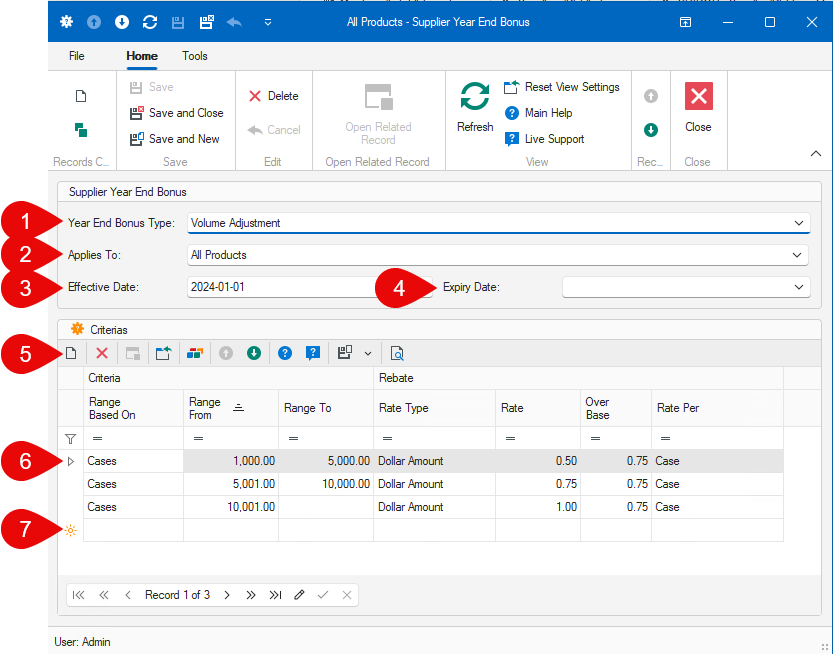
Figure 2: Supplier Year-End Bonus Entry Screen
1. Select the Year-End Bonus Type:
2.Select Applies To:
•All Products: The year-end bonus rule is applicable to all of the supplier's products
•Product Line: The year-end bonus rule is applicable to only the supplier's products associated to a specific Product Line, via an attached rebate structure.
•Individual Product: The year-end bonus rule is applicable to a specific supplier's product.
3.Select the Effective Date. Note: The effective date will automatically change to January 1st of the year of the selected date.
4.(Optional) Select the Expiry Date. Note: The expiry date will automatically change to December 31st of the year of the selected date.
5.Click the New button to add a new criteria to the year-end bonus rule.
6.List of criteria for the bonus rule:
a.Criteria:
i.Range Based On:
▪Not Selected (criteria will not be used)
▪Cases: The range is based on the number of cases purchased.
▪Lbs/Kgs: The range is based on the weight of the products purchased.
▪Purchases Amount: The range is based on the purchases amount total of the purchased products applicable to the bonus rule.
▪FOB Amount: The range is based on the FOB amount (contract pricing) total of the purchased products applicable to the bonus rule.
ii.Range From: Lowest value for the range. The value can be left blank, if there is no minimum value for the range
iii.Range To: Highest value for the range. The value can be left blank, if there is no maximum value for the range.
b.Rebate:
i.Rate Type:
▪Not Selected (no calculations will be performed)
▪Dollar Amount: Specifies that the Rate will be a dollar amount
▪Percentage: Specifies that the Rate will be a percentage of the based on the Rate Per selection. This should only be selected if the Rate Per is either Purchases Amount or FOB Amount.
ii.Rate: Rate used to calculate the year-end bonus amount.
iii.Over Base: Only applicable for the Volume Adjustment year-end bonus rule type. This will change the rate used for the bonus calculations by subtracting the absolute value of the Over Base value from the Rate value. I.e: If the rate is 0.50 and the over base is 0.75, then the effective rate will be 0.50 - 0.75 = -0.25.
iv.Rate Per:
▪Not Selected (no calculations will be performed)
▪Case: The resulting calculation would be the effective rate X the number of cases.
▪Lbs/Kgs: The resulting calculation would be the effective rate X the weight.
▪Purchases Amount: The resulting calculation would be the effective rate X the purchases amount.
▪FOB Amount: The resulting calculation would be the effective rate X the FOB amount.
▪Fixed Amount: The resulting value will be the Rate value as it is entered.
7.You can also add a new criteria by directly entering in the criteria list on the row that is marked with a star.