MHT-Specific Export Options
When exporting a document, you can define MHT-specific exporting options using the following dialog.
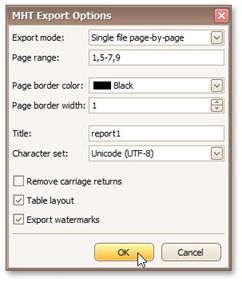
Specifies how a document is exported to MHT. The following modes are available.
The Single file mode allows export of a document to a single file, without dividing it into pages.
The Single file page-by-page mode allows export of a document to a single file, divided into pages. In this mode, the Page range, Page border color and Page border width options are available.
The Different files mode allows export of a document to multiple files, one for each document page. In this mode, the Page range, Page border color and Page border width options are available.
• Page range
Specifies a range of pages which will be included in the resulting file. To separate page numbers, use commas. To set page ranges, use hyphens.
• Page border color
Specifies the color of page borders from the available palettes.
• Page border width
Specifies the width (in pixels) of page borders.
• Title
Title
Specifies the title of the created document.
• Character set
Specifies the character set for the HTML document.
• Remove carriage returns
Specifies whether to remove carriage returns.
• Table layout
Specifies whether to use table or non-table layout in the resulting document.
• Export watermarks
Specifies whether to export watermarks to HTML along with the rest of the document content.