Image-Specific Export Options
When exporting a document, you can define image-specific exporting options using the following dialog.
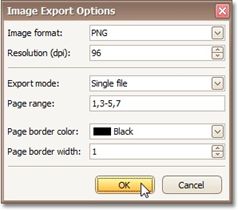
•Image format
Specifies an image format to export a document. Available formats are BMP, GIF, JPEG, PNG, EMF, WMF and TIFF. 
•Resolution (dpi)
Specifies the required image resolution (in dpi).
• Export mode
Specifies how a document is exported to an image. The following modes are available.
The Single file mode allows export of a document to a single file, without dividing the output into pages.
The Single file page-by-page mode allows export of a document to a single file, divided into pages. In this mode, the Page range, Page border color and Page border width options are available.
The Different files mode allows export of a document to multiple files, one for each document page. In this mode, the Page range, Page border color and Page border width options are available.
• Page range
Specifies a range of pages which will be included in the resulting file. To separate page numbers, use commas. To set page ranges, use hyphens.
• Page border color
Specifies the color of page borders.
• Page border width
Specifies the width (in pixels) of page borders.